Save a useful passage.
Select text on a webpage and use the right-click menu. The excerpt stays with the source title, URL, and date.
A RESEARCH WORKSPACE FOR CHROME
Save useful excerpts as you read. Connect them to the points in your brief, then export a document your editor can retrace.
Chrome desktop · Free beta · Stored on your device
Keep the passage you need alongside its URL and your own notes.
Make the evidence easy
for your editor to find.
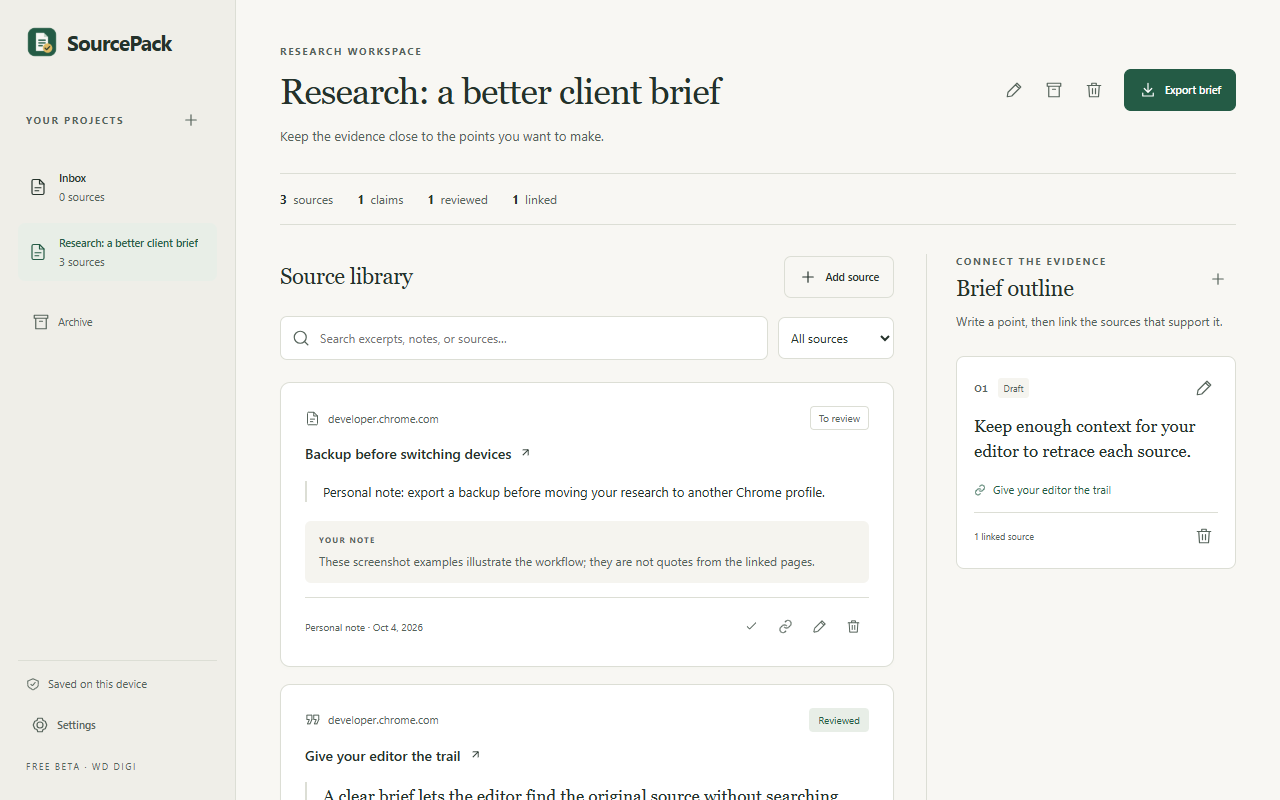
Illustrative example of the research workflow.
FROM READING TO A BRIEF
Select text on a webpage and use the right-click menu. The excerpt stays with the source title, URL, and date.
Add a claim or section heading. Link the passages that help support it, and keep your own notes separate.
Choose Markdown, an HTML document, or a source matrix CSV. Your project stays available in the workspace.
SPACE TO THINK
Keep sources, notes, and your brief outline in one project. Search what you saved, mark what you reviewed, and return to the original source.
ON YOUR DEVICE
No account is needed. Export a backup to move projects to another device.